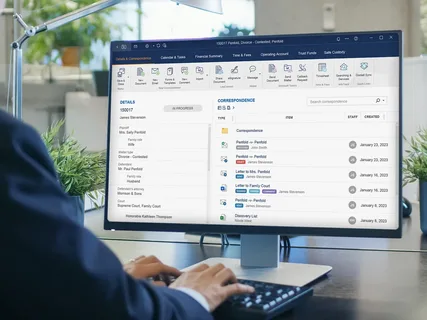
The legal profession has always been built around information.
A single case can involve contracts, evidence, correspondence, court documents, client records, research, notes, invoices, and countless other files. As the number of cases grows, keeping all of this information organized can become a challenge.
For many law firms, the traditional approach of storing documents across folders, email accounts, local computers, and different applications is becoming difficult to manage.
This is where legal case management software can make a real difference.
Modern legal teams need more than a place to store files. They need a structured environment where case information can be organized, sensitive documents can be protected, and authorized team members can collaborate from wherever they are working.
What Is Legal Case Management Software?
Legal case management software is designed to help law firms organize and manage information related to their clients and cases.
Depending on the solution, it can help teams manage:
- Case files
- Client documents
- Contracts
- Legal correspondence
- Research materials
- Internal notes
- Administrative documents
- Shared files
- Case-related information
The main idea is simple: instead of keeping information scattered across different locations, each case can have its own structured digital workspace.
This makes it easier for legal professionals to find the information they need when they need it.
Why Case-Based Organization Matters

Imagine a law firm handling dozens or hundreds of active cases.
If documents are stored in one large shared folder, finding the correct file can become frustrating. There may be multiple clients with similar names, several versions of the same document, or files that belong to completely different matters.
A case-based workspace changes the way information is organized.
Each client or case can have its own dedicated space, allowing documents and information to remain grouped together.
Pocket Office’s legal solution follows this approach by providing case-based workspaces designed to keep legal documents organized by client or case.
Protecting Confidential Legal Information
Confidentiality is one of the most important considerations for any law firm.
Legal teams routinely handle sensitive information that should only be available to authorized people.
A lawyer may need access to a complete case file, while an administrative employee may only need access to specific documents.
This is where permissions become important.
Legal document management software can help firms control who can access particular files and information.
Role-based access can allow organizations to define different permissions according to a person’s responsibilities.
This provides a balance between accessibility and confidentiality.
Pocket Office highlights strict permissions and role-based access as part of its legal workspace, helping legal teams control access to sensitive case information.
Legal Teams Need to Work From More Than One Location
The traditional image of a lawyer working exclusively from a law office is becoming less realistic.
Legal professionals may need to work from:
- Law offices
- Courts
- Client locations
- Home offices
- Meeting rooms
- Other remote locations
This creates a need for secure access to case information outside the traditional office.
A cloud-based legal workspace can make it possible for authorized users to access their files without being tied to one physical computer.
Pocket Office’s legal practice management environment is designed to support secure access to case files from offices, courts, and remote locations.
Collaboration Is Important in Legal Work
Legal cases are rarely handled by one person alone.
A case may involve partners, associates, paralegals, administrative staff, external specialists, and other professionals.
These people may need to review, update, or share different parts of the same case.
Without a structured system, collaboration can quickly turn into a long chain of email attachments and duplicated files.
A shared legal workspace can provide a more organized alternative.
Team members can work with shared resources while permissions determine who can access particular information.
This can help reduce confusion and make collaboration more efficient.
Reducing the Problem of Duplicate Documents

One of the common frustrations of document-heavy work is dealing with multiple versions.
Someone sends a document by email.
Another person downloads it.
A third person makes changes to a different copy.
Eventually, the team has several versions and isn’t completely sure which one is the latest.
Centralized document management can help reduce this problem by keeping files in a shared environment.
When everyone works from the same controlled workspace, it becomes easier to maintain consistency.
Integrating Existing Legal Tools
Law firms don’t necessarily want to replace the software they already use.
Many legal teams have established workflows around specialized platforms.
For example, they may already use tools for case management, document storage, communication, or collaboration.
A good legal practice management software environment should therefore work with existing systems where possible.
Pocket Office’s legal solution supports integrations with tools such as Clio, MyCase, SharePoint, and Google Drive, helping legal teams connect their existing resources with a more structured workspace.
This can be particularly useful for firms that want to improve organization without completely rebuilding their existing technology stack.
The Role of Legal Document Management Software
Case management and document management are closely connected.
A legal team may have excellent case information, but if supporting documents are difficult to find, the overall workflow can still be inefficient.
Legal document management software can help organize contracts, case files, reports, and other legal documentation.
The goal is not simply to store more files.
It is to make documents easier to organize, access, share, and protect.
This becomes especially important as a law firm grows and the number of documents increases.
Cloud Workspaces Can Support Hybrid Law Firms
Hybrid work has changed the way many professional services organizations operate.
Some legal professionals may work from the office while others work remotely.
A cloud workspace can provide a consistent digital environment across these locations.
Instead of creating completely different workflows for office and remote employees, firms can provide authorized users with access to the same digital workspace.
Pocket Office uses a Desktop as a Service (DaaS) approach, centralizing desktops in the cloud and supporting access across locations and devices.
This can give legal teams greater flexibility while maintaining centralized control.
Backup and Recovery Are Also Important
Legal documents can be extremely difficult to recreate.
Losing an important contract, case document, research file, or client record can create serious operational problems.
That is why backup and recovery should be considered when selecting legal technology.
A modern digital workspace should have appropriate processes for protecting important information and recovering it when necessary.
Pocket Office lists backup and recovery among its security capabilities, alongside role-based access and secure data protection.
Making Legal Work More Efficient
Efficiency in legal work doesn’t necessarily mean working faster.
It often means reducing unnecessary administrative steps.
For example:
- Finding a case file should be straightforward.
- Authorized team members should know where documents are stored.
- Sensitive information should have controlled access.
- Teams should be able to collaborate without constantly emailing attachments.
- Lawyers should be able to access approved files when working remotely.
When these basic processes work well, legal professionals can spend more time focusing on their actual legal work.
What Should Law Firms Look For?

Choosing legal case management software requires more than looking at the number of features.
Law firms should consider how well the system fits their existing workflows.
Some important factors include:
Case Organization
Can information be grouped clearly by client and case?
Confidentiality
Can sensitive documents be restricted to authorized users?
Document Management
Can contracts, case files, and other legal documents be organized efficiently?
Remote Access
Can authorized professionals securely access their work when away from the office?
Collaboration
Can legal teams share information without creating unnecessary copies?
Integration
Does the platform work with existing legal and productivity tools?
Security and Recovery
Are access controls, data protection, activity tracking, and backup capabilities available?
The Future of Legal Work Is More Connected
Law firms are becoming increasingly digital.
Documents are digital.
Communication is digital.
Client collaboration is increasingly digital.
Case information is often distributed across multiple systems.
As a result, the future of legal technology isn’t simply about adding more applications.
It is about connecting the tools and information lawyers already depend on.
A structured digital workspace can help bring together case files, documents, applications, collaboration, and secure access.
Final Thoughts
Legal case management software is becoming an important part of how modern law firms organize their work.
The right technology can help legal teams keep case information structured, protect confidential documents, collaborate more effectively, and access their work from different locations.
But technology should never make legal work more complicated.
The best legal technology should work quietly in the background, helping professionals find information faster, collaborate securely, and spend more time focusing on their clients and cases.
For modern law firms, the goal isn’t simply to manage more documents.
It’s to create a more organized, secure, and connected way of managing legal work.
Get in Touch with Pocket Office
Malaysia: +60 146600012
USA: +60 146600012
India: +91 9967940928
Pocket Office Website
Leave a Reply